

The complete technical SEO framework for lead-generation websites, B2B, and SaaS platforms.
Technical SEO for Service Businesses & SaaS: The Complete Framework
Technical SEO is often treated as a “developer thing” or a one-off checklist. For service businesses and SaaS companies, it’s much more than that: it’s the infrastructure that decides whether your best content and high-intent pages ever get discovered, indexed, and converted into leads.
Table of Contents
Introduction: Why Technical SEO Matters for Service Businesses & SaaS
In a lead-generation or SaaS context, technical SEO directly influences:
- How efficiently search engines crawl and discover your key pages (services, pricing, demo, trial, contact).
- Whether those pages are actually indexed and eligible to rank.
- How fast and stable the user experience is when someone lands on your site and decides whether to book a demo, start a trial, or fill out a consultation form.
Unlike e-commerce, where the focus is often on product listings and faceted navigation, service and SaaS websites are usually built around:
- High-intent “money pages” (services, solutions, pricing, demo/trial, contact).
- Thought leadership and educational content (blog, resources, guides, webinars).
- Conversion paths that depend on trust and UX rather than quick checkout flows.
This guide focuses specifically on technical SEO for service businesses, B2B websites, and SaaS platforms. You’ll get a practical technical SEO framework you can use in-house or hand to an agency/consultant to implement.
What Is Technical SEO (For Lead-Gen & SaaS Websites)?
Technical SEO is the process of optimizing the technical setup of your website so search engines can:
- Crawl your pages efficiently.
- Understand and index your content correctly.
- Deliver fast, stable, and secure experiences to users.
For service and SaaS websites, technical SEO sits between content and development:
- On-page/content SEO: What you say and which keywords you target.
- Off-page SEO: Who links to you and how authoritative your brand is.
- Technical SEO: How discoverable, accessible, and performant your site is for both bots and humans.
Key technical entities to understand include:
- Crawlability & crawl budget: Can search engine bots reach your important pages, and are they using their limited crawl resources on the right URLs?
- Indexation: Which pages are actually stored in the search engine’s index and able to rank?
- Site structure & internal linking: How your content is organized and connected.
- Core Web Vitals & performance: How quickly your pages load and respond, and how stable the layout is.
- Structured data / schema markup: Code that helps search engines better understand your business, services, and content.
When your technical SEO is healthy, your content strategy can perform at its full potential. When it’s broken, even the best content can sit invisible in Google’s “blind spot.”
How Technical SEO Impacts Leads, Demos, and Trials
Technical SEO isn’t just about “fixing errors” in a tool. It directly affects revenue-generating KPIs like:
- Leads and MQLs
- Demo bookings
- Free trial sign-ups
- Consultation requests
Some practical examples:
- If pages aren’t indexed, they can’t generate leads. A beautifully designed “Request a Demo” page
that’s blocked by robots.txt or has a
noindextag will never appear in search, no matter how good your copy is. - Slow pages kill conversions. Users landing on a slow pricing page are more likely to bounce before they even see your value proposition. Core Web Vitals (like LCP and INP) are directly tied to user frustration and drop-off.
- Broken site structure hides your services. If your core services or solution pages are buried three or four levels deep, or not linked from your main navigation, Google may see them as less important—and users may never find them.
- Index bloat dilutes crawl budget. Thousands of thin or duplicate URLs (tag pages, search results, filtered URLs) can eat up crawl budget, leading to delayed or incomplete crawling of your key lead-gen pages.
When you align technical SEO work with business outcomes—“fixing X will make our primary service pages easier to discover and faster to load”—it becomes much easier to prioritize and justify the investment.
The 5 Pillars of a Healthy Technical SEO Foundation
A practical technical SEO framework for service businesses and SaaS can be broken down into five core pillars.
1. Crawlability & Crawl Budget
Crawlability is about whether search engine bots can reach your pages. Crawl budget is how many URLs a search engine will crawl on your site within a given period.
Key levers:
robots.txt: This file tells bots which paths they’re allowed (or not allowed) to crawl. For lead-gen sites, you typically:
- Allow access to main content, blog, resources.
- Disallow irrelevant or sensitive paths (e.g.,
/wp-admin/, internal search results, staging environments).
XML sitemaps: Sitemaps list the URLs you want search engines to discover and index. For service/SaaS sites:
- Include key static pages (home, services, pricing, demo, contact).
- Include blog/resources posts that should rank.
- Exclude
noindexpages and low-value URLs.
Internal links: Internal linking guides bots through your site. If a page has no internal links pointing to it (an orphaned page), it’s hard for bots to discover and value it.
Optimizing crawlability means removing crawl traps (infinite calendars, faceted filters), tightening robots.txt, and ensuring your sitemaps and internal links highlight the URLs that matter for leads and trials.
2. Indexation & Canonicalization
Once a page is crawled, Google decides whether to index it. Index coverage is the set of URLs from your site included in Google’s index. Canonicalization is how you signal the “main” version of a page when multiple URLs contain similar or identical content.
Key points:
Index coverage: Use Google Search Console’s Index Coverage (Pages) reports to see:
- Which pages are indexed.
- Which are not indexed and why (e.g., “Crawled – currently not indexed”, “Duplicate, Google chose different canonical”).
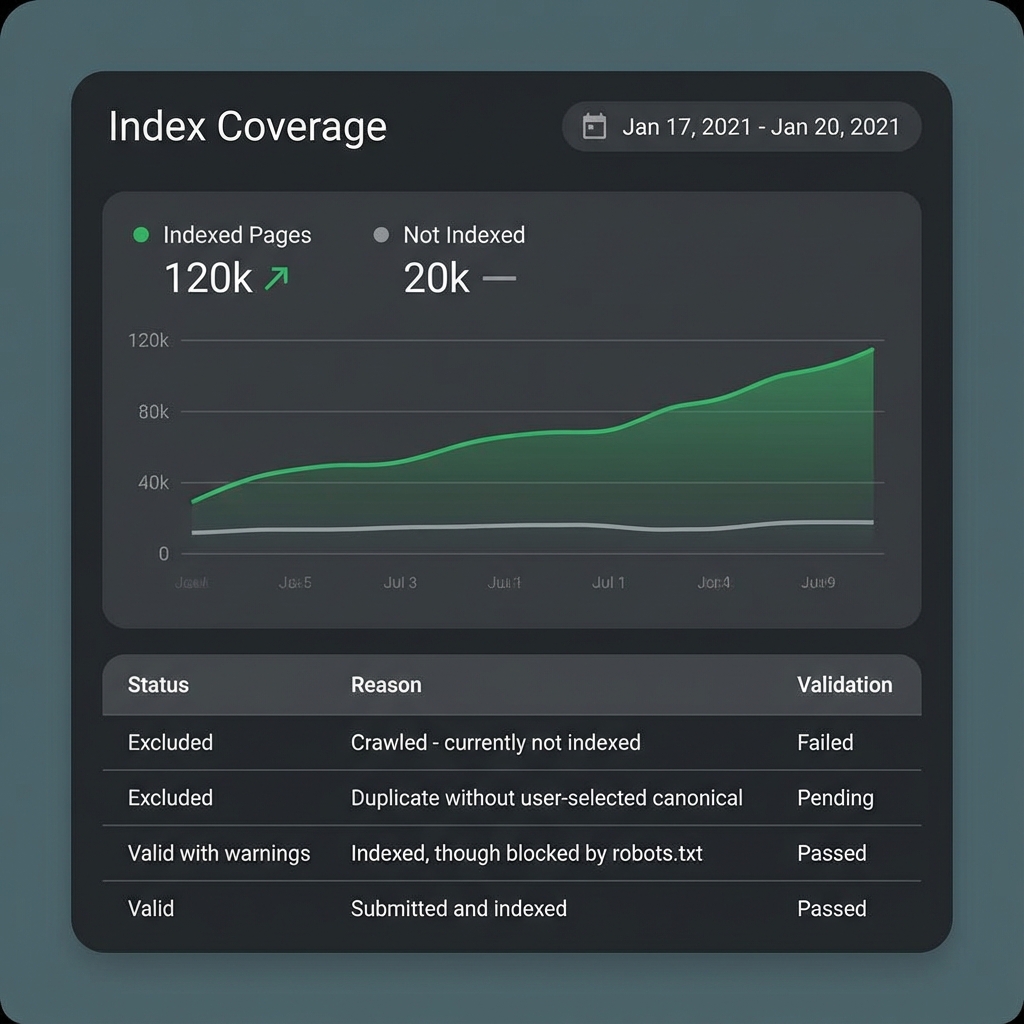
Figure 2: Monitor your 'Not Indexed' reasons to find technical blockers.
Canonical tags: A canonical tag (<link rel="canonical" href="..." />) tells
search engines which version of a URL is the preferred one.
- Example:
https://example.com/pricing/is canonical, whilehttps://example.com/pricing?utm_source=googleshould point to it. - Avoid self-contradictions (canonical pointing to a different page without reason).
Duplicate content & index bloat: Common sources:
- Multiple URL variations (
/,/index.php, tracking parameters). - Tag/category archives with overlapping content.
- Staging or test environments being indexed.
Effective technical SEO for B2B websites and SaaS means you keep the index lean and focused: only high-value pages that deserve to rank are indexable.
3. Site Structure & Internal Linking
Your site architecture is how your content is organized in directories and how pages connect via internal links. For service and SaaS websites, a logical structure is critical to communicating your core offerings to both users and search engines.
A good approach is a hub-and-spoke or topic cluster model:
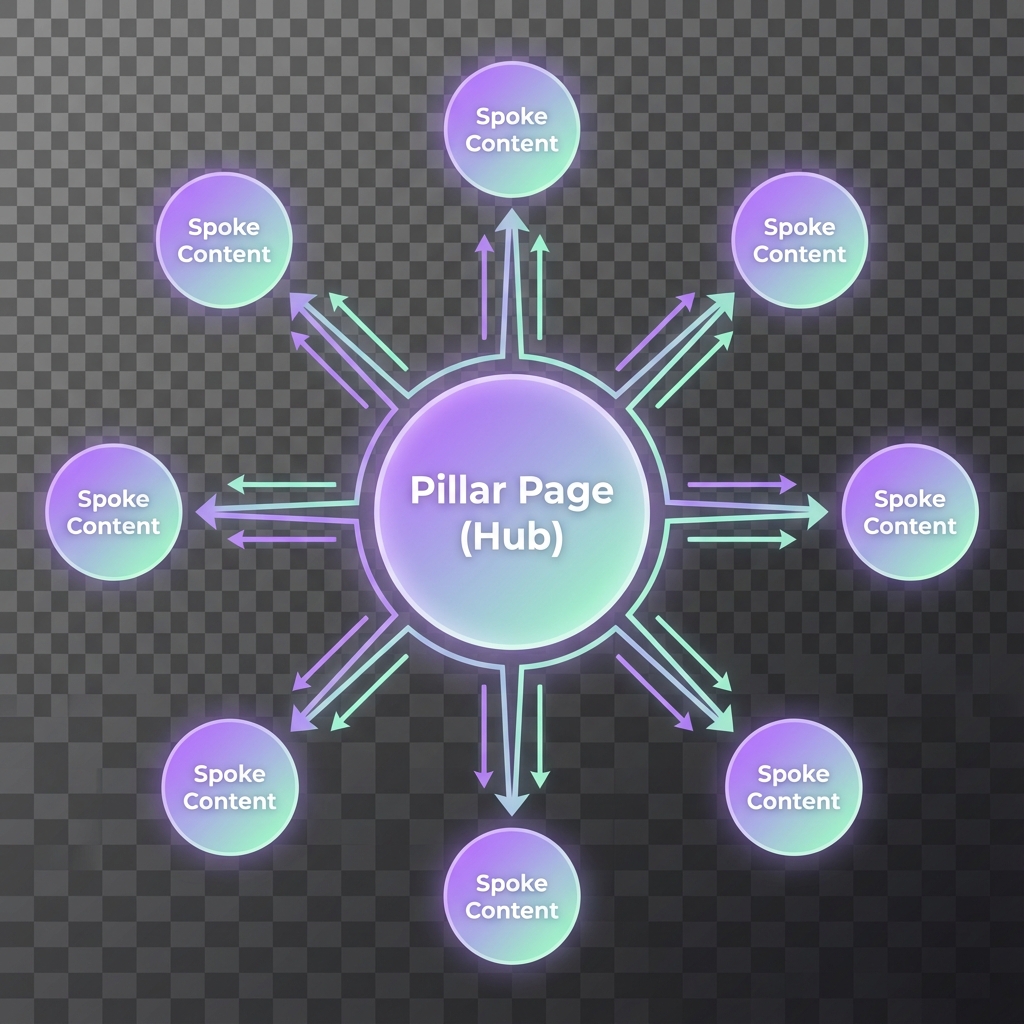
Figure 1: The Hub & Spoke model concentrates authority on your money pages.
- Hubs (pillar pages): High-level service or solution pages that target broader topics, e.g.:
/services/seo-consulting//solutions/enterprise-saas-platform/
- Spokes (supporting content): Blog posts, guides, and resources that go deeper into subtopics and
link back to the hub, e.g.:
- “Technical SEO Audit Checklist for Lead-Gen Websites” → [Link to: Technical SEO Audit Checklist for Lead-Gen Websites]
Best practices:
- Keep important pages no more than 2–3 clicks from the homepage.
- Use clear, descriptive URLs (e.g.
/services/technical-seo/instead of/page-id=123). - Use breadcrumb navigation to reinforce hierarchy and help both users and bots.
4. Performance & Core Web Vitals
Page speed and performance are no longer just “nice to have.” Google’s Core Web Vitals are user-centric performance metrics that influence rankings and, more importantly, conversions.
The three primary Core Web Vitals are:
- Largest Contentful Paint (LCP): Measures how fast the main content loads. Aim for under 2.5 seconds.
- Interaction to Next Paint (INP): Replaces FID; measures responsiveness when a user interacts (clicks, taps, key presses).
- Cumulative Layout Shift (CLS): Measures layout stability (e.g., buttons shifting as ads or images load). Aim for minimal movement.
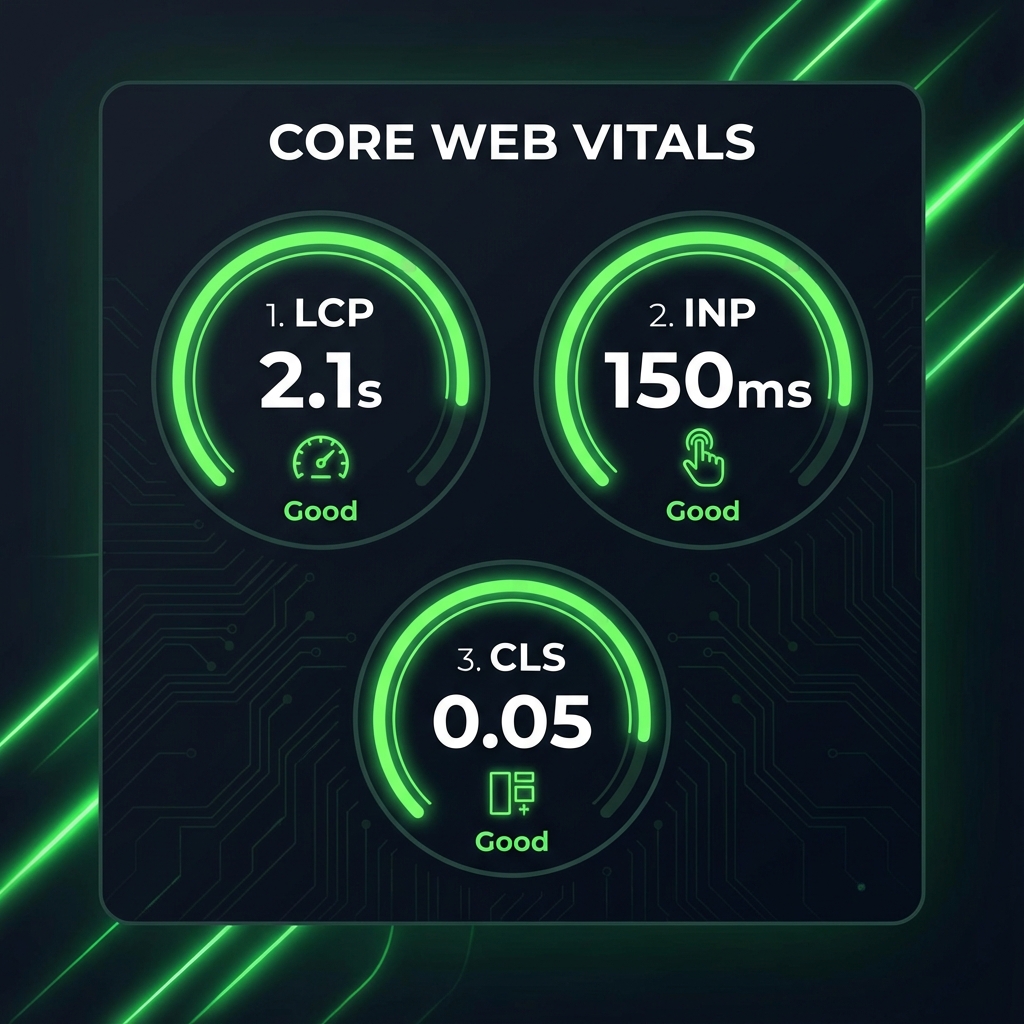
Figure 3: Aim for 'Good' (Green) scores on LCP, INP, and CLS.
For service businesses and SaaS:
- Slow LCP on your pricing or demo page directly hurts lead generation.
- Poor INP on forms (e.g., laggy interactions or validation) leads to users abandoning sign-ups.
- High CLS on landing pages can cause misclicks and frustration, eroding trust.
Common fixes include optimizing images (compression, modern formats like WebP), reducing render-blocking scripts, using a performance-focused theme/framework, and deferring non-critical JavaScript.
For deeper performance guidance, you might later create a supporting article such as: [Link to: Core Web Vitals for Service Businesses].
5. Structured Data & SERP Enhancements
Structured data (schema markup) is code (usually JSON-LD) added to your pages to help search engines understand specific entities: your organization, services, articles, FAQs, etc.
While structured data is not a direct ranking factor, it can:
- Improve how your snippets appear in search (rich results).
- Increase click-through rate (CTR) on key pages.
- Clarify context around your brand and offerings.
Useful schema types for service and SaaS sites:
- Organization: Your company details (name, logo, social profiles).
- LocalBusiness: If you have physical offices or service areas (ties into local SEO).
- Service / Product: Key offerings, especially for service businesses and packaged SaaS tiers.
- Article / BlogPosting: For content marketing and thought leadership.
- FAQPage: For FAQ sections on service or feature pages.
- BreadcrumbList: For breadcrumb navigation.
Example use case:
- A “Pricing & Plans” page could use
ProductorServicemarkup for each plan, plus FAQPage schema for common pricing questions. - A resource article like “Technical SEO Audit Checklist for Lead-Gen Websites” could use Article and FAQPage schema to support expanded SERP features.
Always validate your structured data with Google’s Rich Results Test and fix warnings/errors before deploying widely.
A Step-by-Step Technical SEO Audit Framework
Here is a practical technical SEO framework you can use for a technical SEO audit of a service or SaaS website. You can run it internally or as the basis of a consultant engagement.
Step 1 – Crawl the Website
Begin by crawling your site to see it the way a search engine might.
Tools you can use:
- Screaming Frog SEO Spider (popular and powerful for most B2B/SaaS sites).
- Sitebulb (visual reporting, helpful for agencies).
- Semrush Site Audit or Ahrefs Site Audit (good for ongoing monitoring).
What to look for:
- Response codes:
- 200 (OK): Most content should return this.
- 3xx: Redirects. Check for long redirect chains or loops.
- 4xx: Broken pages (404, 410). Prioritize fixing or redirecting key ones.
- 5xx: Server errors—critical to fix quickly.
- Broken links: Internal links pointing to 404s waste crawl budget and harm UX. Update or remove broken links, or redirect to the most relevant alternative.
- Canonical tags: Ensure each indexable page has a consistent, self-referential canonical (unless intentionally pointing elsewhere). Look for duplicates where multiple URLs share the same content but have inconsistent canonicals.
- Directives & meta tags: Identify pages with
noindex,nofollow, or other directives. Confirm they match your intent (e.g.,noindexon thank-you pages, internal search results, but not on key service pages).
Step 2 – Analyze Indexation with Google Search Console
Next, move to Google Search Console (GSC) to understand how Google sees your site.
Key reports:
Pages (Indexing > Pages):
- Indexed: Are your important service, pricing, and demo pages included?
- Not indexed: Review reasons:
- “Crawled – currently not indexed”
- “Discovered – currently not indexed”
- “Duplicate, Google chose different canonical”
- “Alternate page with proper canonical tag”
Sitemaps report:
- Check your submitted XML sitemaps.
- Confirm they:
- Are valid and updated.
- Only include URLs you want indexed.
- Match your canonical versions (e.g., https vs http, www vs non-www).
Patterns to look for:
- High-value pages not indexed or marked as duplicates.
- Large numbers of low-value URLs (e.g., parameters, archives) being crawled but not indexed.
- Mismatches between what your sitemap suggests and what’s actually indexed.
Step 3 – Review Site Architecture & Internal Links
Now evaluate your site structure and internal linking in more depth.
Questions to ask:
- Are key “money pages” prominent? Services, solutions, pricing, demo, trial, contact should be
linked in:
- Main navigation.
- Contextual internal links from relevant blog/resources.
- Footer (for extra discoverability).
- Shallow vs deep pages:
- Shallow pages: Within 1–3 clicks from the homepage.
- Deep pages: Buried 4+ levels down.
- Important pages (services, high-intent resources) should be shallow.
- URL structure: Use clean, logical directories:
/services/technical-seo//industries/b2b-saas//resources/technical-seo-audit-checklist/
- Breadcrumbs: Breadcrumb navigation improves UX and provides additional internal links. Use consistent hierarchy and consider adding Breadcrumb schema.
For B2B and SaaS, consider formalizing topic clusters. Example:
- Hub: “Technical SEO for Service Businesses & SaaS: The Complete Framework” (this article).
- Spokes:
- [Link to: Technical SEO Audit Checklist for Lead-Gen Websites]
- [Link to: Internal Linking & Site Architecture for B2B Websites]
- [Link to: Core Web Vitals for Service Businesses]
Step 4 – Check Performance & Core Web Vitals
With structure in place, review website performance and Core Web Vitals.
Tools:
- Google PageSpeed Insights – For lab data and recommendations on specific URLs.
- Google Search Console → Experience → Core Web Vitals – For field data (real-user metrics) across your site.
- Lighthouse (in Chrome DevTools) – For deeper page audits.
Focus on Key Templates: Homepage, Top service/solution pages, Pricing/demo/trial pages, Popular blog posts.
Common issues:
- Large, unoptimized images: Use correct dimensions; compress images. Serve next-gen formats (WebP/AVIF where possible). Implement lazy loading for below-the-fold visuals.
- Render-blocking resources: Minimize CSS/JS that blocks the first paint. Defer non-critical scripts (e.g., some third-party widgets). Consolidate or remove unused libraries.
- Unoptimized fonts: Use modern formats (e.g., WOFF2). Limit the number of font weights/styles. Use
font-display: swapto avoid invisible text during load.
Step 5 – Validate Structured Data & Key Technical Settings
Finally, confirm that your structured data and site-wide technical settings are correct.
Structured data checks:
- Use Google’s Rich Results Test or Schema.org Validator on Homepage, Service pages, Blog posts/resources, and Breadcrumb-enhanced pages.
- Resolve errors (invalid properties) and critical warnings (missing recommended fields on key schemas).
Other settings to verify:
- Canonicalization rules: HTTP vs HTTPS (force HTTPS), www vs non-www (choose one and redirect the other), Trailing slash vs non-trailing slash (be consistent).
- Internationalization basics (if applicable): If you operate in multiple languages or regions, confirm high-level hreflang strategy is planned. Detailed hreflang implementation is complex and often deserves a dedicated project.
- Redirect rules: Ensure no old/staging domains are indexable. Check that legacy URLs correctly redirect to current equivalents.
Common Technical SEO Issues on Service & SaaS Websites
Below are frequent technical SEO issues that impact traffic, leads, and sign-ups, especially on WordPress or custom SaaS marketing sites:
- Orphaned service pages: Service or solution pages exist but are not linked from navigation, blog posts, or other pages. Impact: Lower crawl frequency, weaker rankings, fewer demo/consultation visits.
- Multiple versions of the site: Both
http://andhttps://, orwwwand non-wwwversions are accessible. Impact: Duplicate content, diluted authority, and potential index confusion. - Missing or incorrect canonical tags: No canonical tags on key templates or multiple pages pointing to the wrong canonical. Impact: Google may index suboptimal URLs or consider core pages as duplicates.
- Bloated tag/category archives: Hundreds of thin tag pages with overlapping content. Impact: Crawl budget wasted on low-value URLs; possible index bloat and diluted relevance.
- Slow WordPress page builders and bloated themes: Heavy themes and builder plugins (with many unused scripts) used for simple pages. Impact: Poor Core Web Vitals on key landing pages → fewer trial sign-ups and demo requests.
- No indexation of blog or resources section: Entire sections blocked via robots.txt,
noindextags, or incorrect canonicalization. Impact: Thought leadership content doesn’t drive organic awareness or top-of-funnel traffic. - Misconfigured redirects after redesign/migration: Old URLs not mapped properly, or mass redirects to the homepage. Impact: Loss of historical ranking signals; significant drops in organic traffic and leads.
Technical SEO Prioritization: What to Fix First
Not every technical issue is equally important. To make technical SEO actionable, you need a prioritization framework based on impact on indexation, conversion pages, and level of effort.
| Priority | Impact / Effort | Examples |
|---|---|---|
| Quadrant 1: Quick Wins | High Impact Low Effort |
|
| Quadrant 2: Strategic Fixes | High Impact High Effort |
|
| Quadrant 3: Hygiene Tasks | Low Impact Low Effort |
|
| Quadrant 4: Low-Value | Low Impact High Effort |
|
When in doubt, ask: “Does fixing this help more people discover and convert on our key lead-gen pages in the next 3–6 months?”
How Technical SEO Fits into Your Overall SEO Strategy
Technical SEO is the foundation, not the entire house. For service businesses and SaaS companies, a complete SEO strategy connects:
- Technical SEO: Ensures your site is crawlable, indexable, fast, and stable.
- Content strategy & keyword targeting: Identifies the search terms (e.g., “technical SEO for SaaS”) and markets content to different funnel stages (TOFU, MOFU, BOFU).
- Off-page & authority building: Acquiring relevant backlinks and brand mentions.
- Local SEO (if relevant): Optimizing Google Business Profiles and local citations.
- Analytics & tracking (GA4, GTM): Measuring user interaction and conversions to refine efforts.
When to Hire a Technical SEO Consultant
Many service businesses and SaaS teams can handle basic technical SEO internally. However, there are clear signs that you may benefit from dedicated expert support.
Consider hiring a consultant if:
- You have persistent indexation issues (pages not indexing despite efforts).
- Your site is complex (marketing site + web app, multi-language/region).
- You recently migrated or redesigned your site and traffic dropped.
- You lack internal technical bandwidth or expertise.
A good technical SEO consultant for B2B and SaaS will perform a thorough audit, translate findings into a prioritized roadmap, coordinate with teams, and set up monitoring. They act as a bridge between marketing, product, and engineering.
Conclusion: Build a Scalable Technical SEO Foundation
Technical SEO for service businesses and SaaS is not about chasing every minor score or fixing every warning. It’s about ensuring your marketing site is Discoverable, Indexable, Organized, Fast & Stable, and Understandable.
By focusing on the five pillars and following a step-by-step audit framework, you give your content and brand the best chance to win in organic search.
If you’re unsure where to start: Run an initial crawl and GSC review. Identify and prioritize your top technical blockers. Build a 60–90 day roadmap focused on your highest-impact fixes. If you need help, consider a technical SEO audit led by an experienced consultant.